Dynamic map container với Traefik + Wildcard DNS
Cách các nền tảng như Replit expose app mà không cần config tay
Khi build một platform kiểu Replit / Railway / vibe-coding server, một trong những bài toán quan trọng nhất là:
❓ Làm sao mỗi container vừa chạy lên là có ngay URL preview, không cần sửa nginx config hay update DNS liên tục?
Câu trả lời nằm ở Traefik + Wildcard DNS.
Bài viết này sẽ hướng dẫn:
- “Dynamic map container” thực sự là gì
- Vì sao nginx không phù hợp cho platform
- Cách Traefik auto route container bằng Docker labels
- Cách cấu hình DNS một lần duy nhất với Cloudflare
- Pro tips để setup giống Replit
1. Vấn đề với reverse proxy truyền thống
Giả sử bạn có nhiều app chạy bằng Docker:
| Project | Port |
|---|---|
| proj-a | 3000 |
| proj-b | 5173 |
| proj-c | 8000 |
Bạn muốn:
proj-a.example.com → proj-a:3000
proj-b.example.com → proj-b:5173
Với nginx, bạn phải:
- Viết config cho từng project
- Reload nginx mỗi lần thêm/xoá app
- Biết trước port container
👉 Cách này không scale khi container được tạo/xoá liên tục.
2. Traefik là gì? (theo góc nhìn platform)
Traefik là reverse proxy “dynamic-first”:
- Tự đọc Docker API
- Tự phát hiện container
- Tự update routing (zero downtime)
👉 Rất phù hợp cho:
- Preview URL
- Multi-project
- SaaS / internal platform
3. “Dynamic map container” nghĩa là gì?
Dynamic map container =
Container chạy lên → Traefik tự map domain → container:port thông qua metadata (labels).
Không cần:
- Viết file config
- Reload proxy
- Expose port ra host
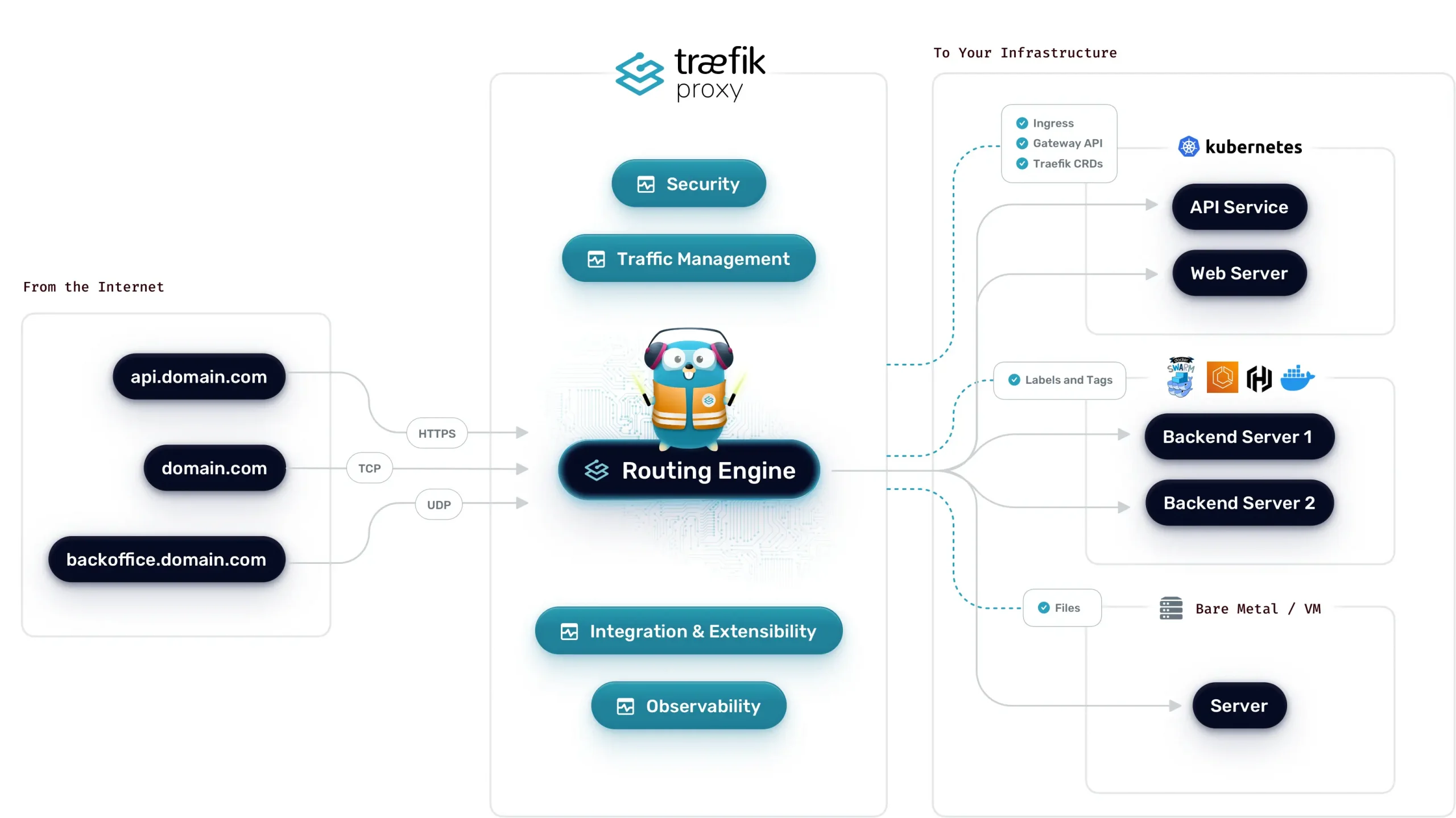
4. Kiến trúc tổng thể
Browser
   |
   v
[ Traefik :80/:443 ]
   |
   +--> proj-a container (3000)
   |
   +--> proj-b container (5173)
👉 Traefik là cổng public duy nhất.
5. Setup Traefik cơ bản với Docker
docker-compose.yml
version: "3.8"

services:
  traefik:
    image: traefik:v3.0
    command:
      - "--providers.docker=true"
      - "--providers.docker.exposedbydefault=false"
      - "--entrypoints.web.address=:80"
    ports:
      - "80:80"
    volumes:
      - /var/run/docker.sock:/var/run/docker.sock:ro
Chạy:
docker compose up -d👉 Traefik giờ đang “nghe” Docker events.
6. Expose container bằng Docker labels
Ví dụ app Node chạy port 3000:
docker run -d \
  --name proj-abc \
  --label "traefik.enable=true" \
  --label "traefik.http.routers.proj-abc.rule=Host(`proj-abc.example.com`)" \
  --label "traefik.http.services.proj-abc.loadbalancer.server.port=3000" \
  node:20 \
  node server.js
👉 Không expose port, không sửa config.
7. DNS có cần update mỗi container không?
CÓ DNS — nhưng KHÔNG update liên tục.
Hiểu đúng vai trò:
- DNS: domain → IP VPS
- Traefik: route request → container
👉 DNS không biết container nào, Traefik không resolve DNS.
8. Cách đúng: Wildcard DNS ⭐
Chỉ cần 1 record DNS duy nhất
Type: A
Name: *
Value: <VPS_IP>
Từ đó:
abc.example.com → VPS
proj-123.example.com → VPS
👉 DNS setup một lần là xong.
9. Pro tip cho Cloudflare (rất quan trọng)
Cấu hình DNS chuẩn
Type: A
Name: *
IPv4: <VPS_IP>
Proxy: OFF (mây xám)
Vì sao phải Proxy OFF?
- Tránh SSL double layer
- Cho Traefik tự handle cert
- Debug dễ hơn
👉 Platform kiểu Replit KHÔNG bật proxy CF ở layer preview.
10. SSL cho wildcard domain (production-grade)
Option A — HTTP-01 (dễ)
- Traefik xin cert từng subdomain
Option B — DNS-01 (PRO ⭐)
- Xin cert
*.example.com - Không cần mở port 80
- Dùng Cloudflare API token
Replit-style → DNS-01.
11. Traefik + Cloudflare DNS-01 (ví dụ)
certificatesResolvers:
  cloudflare:
    acme:
      email: [email protected]
      storage: /letsencrypt/acme.json
      dnsChallenge:
        provider: cloudflare
Env:
CF_DNS_API_TOKEN=xxxxx👉 Traefik tự tạo / xoá TXT record khi verify SSL.
12. Flow hoàn chỉnh giống Replit
User mở proj-abc.example.com
        ↓
Cloudflare wildcard DNS → VPS
        ↓
Traefik
  - match Host
  - forward container
        ↓
Project container
👉 Không có bước update DNS động.
13. Ưu & nhược điểm
✅ Ưu điểm
- Zero config tay
- Scale tốt
- Phù hợp SaaS / platform
- Auto SSL
⚠️ Nhược điểm
- Debug khó hơn nginx
- Phải hiểu Docker labels
- Cần kỷ luật security
Kết luận
Traefik + Wildcard DNS là nền tảng bắt buộc nếu bạn muốn build platform giống Replit.
Nếu bạn làm được:
- Docker isolation
- Traefik dynamic routing
- DNS wildcard đúng cách
👉 Bạn đã nắm 80% hạ tầng preview system.
================
Dynamic Container Mapping with Traefik + Wildcard DNS
How platforms like Replit expose apps without manual config
When building a platform like Replit, Railway, or a vibe-coding server, one of the most important infrastructure challenges is:
❓ How can each container get its own preview URL instantly, without editing nginx configs or updating DNS every time?
The answer is Traefik + Wildcard DNS.
In this article, you’ll learn:
- What “dynamic container mapping” really means
- Why nginx is not ideal for platforms
- How Traefik auto-routes containers using Docker labels
- How to configure DNS once and forget about it with Cloudflare
- Pro tips for a Replit-style setup
1. The problem with traditional reverse proxies
Imagine you have multiple Docker apps:
| Project | Port |
|---|---|
| proj-a | 3000 |
| proj-b | 5173 |
| proj-c | 8000 |
You want:
proj-a.example.com → proj-a:3000
proj-b.example.com → proj-b:5173
With nginx, you must:
- Write a config for each project
- Reload nginx every time
- Know container ports in advance
👉 This does not scale when containers are created and destroyed dynamically.
2. What is Traefik? (platform perspective)
Traefik is a “dynamic-first” reverse proxy:
- Automatically reads the Docker API
- Detects containers in real time
- Updates routing with zero downtime
Perfect for:
- Preview URLs
- Multi-project environments
- SaaS / internal platforms
3. What does “dynamic container mapping” mean?
Dynamic container mapping =
A container starts → Traefik automatically maps a domain → container:port using metadata (labels).
No need to:
- Edit config files
- Reload the proxy
- Expose container ports to the host
4. Architecture overview
Browser
   |
   v
[ Traefik :80/:443 ]
   |
   +--> proj-a container (3000)
   |
   +--> proj-b container (5173)
Traefik is the only public entry point.
5. Basic Traefik setup with Docker
docker-compose.yml
version: "3.8"

services:
  traefik:
    image: traefik:v3.0
    command:
      - "--providers.docker=true"
      - "--providers.docker.exposedbydefault=false"
      - "--entrypoints.web.address=:80"
    ports:
      - "80:80"
    volumes:
      - /var/run/docker.sock:/var/run/docker.sock:ro
Run:
docker compose up -d
Traefik is now listening to Docker events.
6. Expose a container using Docker labels
Example Node app on port 3000:
docker run -d \
  --name proj-abc \
  --label "traefik.enable=true" \
  --label "traefik.http.routers.proj-abc.rule=Host(`proj-abc.example.com`)" \
  --label "traefik.http.services.proj-abc.loadbalancer.server.port=3000" \
  node:20 \
  node server.js
No port exposure. No config files.
7. Do we need to update DNS for every container?
DNS is required — but not updated dynamically.
Correct mental model:
- DNS: domain → VPS IP
- Traefik: route request → container
DNS does not know about containers.
Traefik does not resolve DNS.
8. The right solution: Wildcard DNS ⭐
Create one DNS record:
Type: A
Name: *
Value: <VPS_IP>
Now:
abc.example.com → VPS
proj-123.example.com → VPS
DNS is configured once and done.
9. Cloudflare pro tip (important)
Recommended DNS setup:
Type: A
Name: *
IPv4: <VPS_IP>
Proxy: OFF (gray cloud)
Why Proxy OFF?
- Avoid double SSL layers
- Let Traefik manage certificates
- Easier debugging
Replit-style preview systems do not use Cloudflare proxy.
10. SSL for wildcard domains (production-grade)
Option A — HTTP-01 (easy)
Traefik requests certs per subdomain.
Option B — DNS-01 (PRO ⭐)
- Single cert:
*.example.com - No need to open port 80
- Uses Cloudflare API token
Replit-style production setups use DNS-01.
11. Traefik + Cloudflare DNS-01 example
certificatesResolvers:
  cloudflare:
    acme:
      email: [email protected]
      storage: /letsencrypt/acme.json
      dnsChallenge:
        provider: cloudflare
Environment variable:
CF_DNS_API_TOKEN=xxxxx
Traefik automatically creates and deletes TXT records.
12. Full Replit-style request flow
User opens proj-abc.example.com
        ↓
Cloudflare wildcard DNS → VPS
        ↓
Traefik
  - matches Host
  - forwards to container
        ↓
Project container
No dynamic DNS updates needed.
13. Pros & Cons
✅ Pros
- No manual config
- Scales well
- Perfect for SaaS platforms
- Automatic SSL
⚠️ Cons
- Harder to debug than nginx
- Requires understanding Docker labels
- Needs strict security controls
Conclusion
Traefik + Wildcard DNS are foundational if you want to build a Replit-like platform.
If you can handle:
- Docker isolation
- Traefik dynamic routing
- Proper wildcard DNS
Then you already understand 80% of a modern preview infrastructure.