Th?nk And Grow
https://blog.thnkandgrow.com/
Let's Do It!Fri, 27 Mar 2026 08:38:05 +0000en-US
hourly
1 https://wordpress.org/?v=6.9.4https://d1gj38atnczo72.cloudfront.net/wp-content/uploads/2024/04/18114102/cropped-thnkandgrow-logo-32x32.jpgTh?nk And Grow
https://blog.thnkandgrow.com/
3232How to Design Scalable AI-Powered Systems in 2026
https://blog.thnkandgrow.com/how-to-design-scalable-ai-powered-systems-2026/
https://blog.thnkandgrow.com/how-to-design-scalable-ai-powered-systems-2026/#respondFri, 27 Mar 2026 08:38:05 +0000https://blog.thnkandgrow.com/?p=3498Building AI-powered systems in 2026 looks nothing like traditional software architecture — and the gaps will cost you. This guide breaks down the dominant patterns (RAG, agent architectures, compound AI systems) and the critical design concerns around cost, latency, and observability that separate reliable production systems from ones that silently degrade. If you're building or scaling LLM-powered applications, this is the architectural foundation you can't afford to skip.
]]>Getting a model to work is no longer the hard part. In 2026, any reasonably experienced ML engineer can spin up a fine-tuned LLM, wire it to an API, and demo something impressive in an afternoon. The real challenge — the one separating teams shipping reliable AI products from teams perpetually firefighting — is everything that surrounds the model: the data pipelines, the serving infrastructure, the observability stack, the feedback loops, and the architectural decisions that determine whether your system holds up at scale or quietly falls apart under production load.
This shift has been building for years, but it has accelerated sharply. AI has moved from the research lab to the core of commercial products, and the engineering discipline required to support that transition is now genuinely mature. MLOps, LLMOps, compound AI systems, AI gateways — these are not buzzwords. They are responses to real, hard problems that teams encounter when they try to run AI systems reliably, cost-efficiently, and in compliance with an increasingly demanding regulatory environment.
What follows is a practical guide to the architectural decisions, tools, and patterns that define production-grade AI system design in 2026. It is written for engineers and architects who are past the experimentation phase and are serious about building systems that last.
Why AI System Design Is Different from Traditional Software Architecture
Traditional software systems fail loudly. A null pointer exception throws a stack trace. A database query times out and returns an error. A misconfigured load balancer drops requests, and your monitoring alerts fire within seconds. The failure modes are visible, traceable, and usually fixable with a clear root cause.
AI systems fail quietly. A model that has drifted from its training distribution does not crash — it continues returning responses that look plausible but are subtly wrong. A retrieval pipeline with degraded recall does not throw an exception — it just stops surfacing the right documents, and users get slightly worse answers. These silent degradations can persist for weeks before anyone notices, and by then the damage to user trust or business outcomes may already be significant.
Beyond failure modes, AI systems introduce categories of concern that traditional software architecture simply does not address. Model lifecycle management — the process of training, evaluating, deploying, monitoring, and retraining models — is a continuous operational concern, not a one-time deployment event. Data pipelines are not just ETL jobs; they are the foundation of model quality, and versioning them with the same rigor as code is essential for reproducibility. Feedback loops, where model outputs influence future inputs, can create compounding quality problems if not carefully managed. And compute cost management is a design constraint from day one — inference at scale is expensive in ways that serving traditional software is not.
The regulatory dimension adds further complexity. The EU AI Act, now in active enforcement, requires that high-risk AI systems demonstrate explainability, maintain audit trails, and undergo conformity assessments. Designing for auditability is not something you can retrofit onto a system built without it in mind. It has to be part of the architecture from the start.
Core Components of a Modern AI System
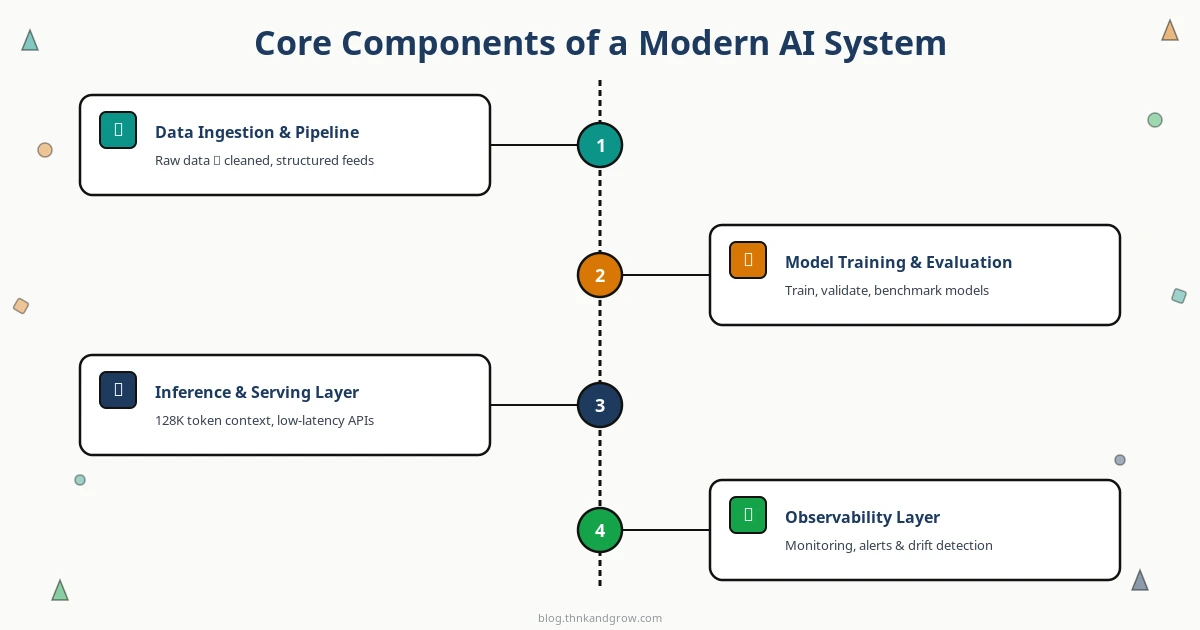
A production AI system is not just a model behind an API. It is a composition of several distinct layers, each with its own engineering requirements.
The data ingestion and pipeline layer handles the flow of raw data into the system — cleaning, normalization, transformation, and versioning. At scale, this means treating datasets as first-class versioned artifacts, using tools like DVC or Delta Lake to track lineage, and building pipelines that are reproducible and auditable. Data quality failures here propagate into every downstream component.
The model training and evaluation infrastructure encompasses experiment tracking, hyperparameter management, model registries, and reproducibility tooling. Without this layer, teams lose the ability to understand why a model performs the way it does, reproduce past results, or safely roll back to a previous version. MLflow and Weights & Biases have become standard here, not optional.
The inference and serving layer is where latency, throughput, and cost trade-offs become real. Serving a large language model in production is an infrastructure problem of significant complexity — memory management, batching strategies, hardware utilization, and request routing all affect both cost and user experience. This layer deserves as much architectural attention as any other.
The observability layer monitors model behavior in production: tracking output quality, detecting distribution shift, flagging bias, and alerting on performance degradation. Without this, you are flying blind. Tools like Arize AI, Evidently, and Langfuse have matured considerably and should be part of any production AI stack.
Key Architectural Patterns for LLM-Powered Applications
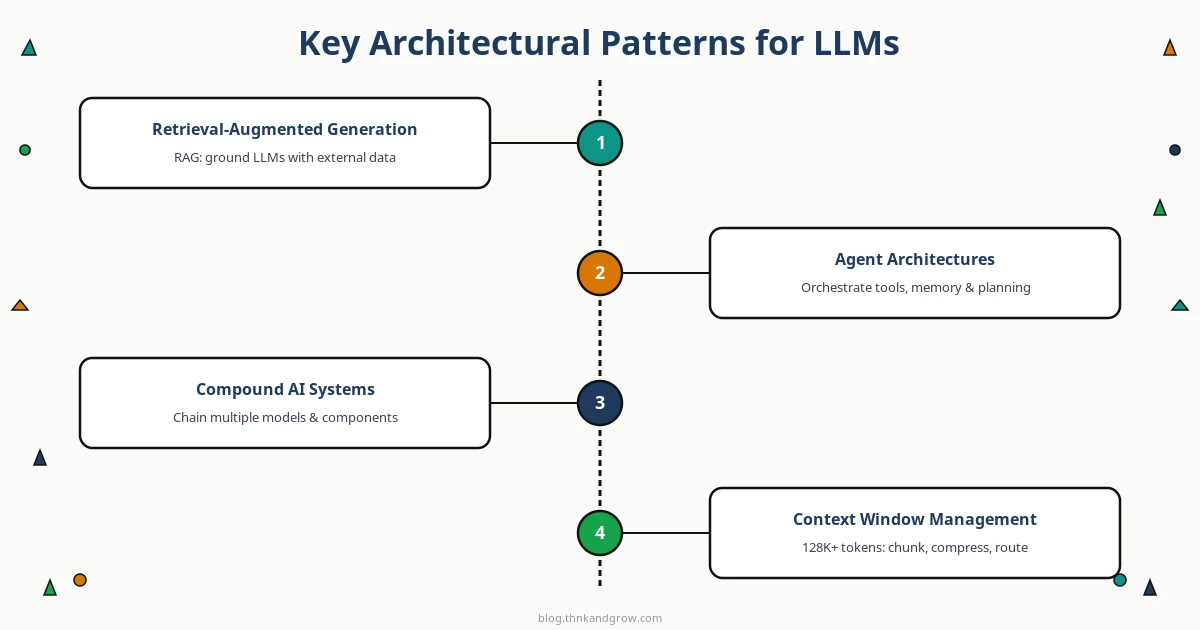
Three patterns dominate LLM application architecture in 2026, and understanding when to use each is one of the most important decisions you will make.
Retrieval-Augmented Generation (RAG) remains the workhorse pattern for applications that need grounded, up-to-date, or domain-specific responses. The architecture combines a vector database — Pinecone, Qdrant, Weaviate, or pgvector for teams already on Postgres — with an LLM. At query time, semantically relevant documents are retrieved and injected into the model’s context. RAG sidesteps the hallucination problem for factual queries and avoids the cost of constant fine-tuning. The engineering challenges are retrieval quality (recall and precision matter enormously), chunking strategy, and keeping the vector index fresh as source data changes.
Agent architectures go further, giving the LLM the ability to take actions: calling APIs, executing code, browsing the web, querying databases. Frameworks like LangChain, CrewAI, and AutoGen provide the scaffolding for building agents, but the hard problems are orchestration reliability, state management across multi-step reasoning chains, and safety — an agent that can take actions in the world needs guardrails that a pure generation system does not. Designing for graceful failure and human-in-the-loop interruption points is essential.
Compound AI systems, a term formalized by Berkeley AI Research and Databricks, describe architectures that chain multiple models, retrievers, and tools into a unified workflow. A document processing pipeline might use a vision model to extract content from PDFs, a classification model to route documents, a RAG pipeline for context retrieval, and an LLM for final synthesis. Each component can be optimized, replaced, or scaled independently. This modularity is a significant advantage at scale, but it introduces coordination complexity and makes end-to-end observability harder.
Context window management is a design concern that often gets underestimated. Modern models support context windows of 128K tokens or more, but stuffing them indiscriminately is both expensive and often counterproductive. Strategies like hierarchical summarization, sliding window approaches, and selective retrieval are worth implementing deliberately rather than defaulting to “just fit it all in.”
Choosing the Right Tools and Infrastructure Stack
Tool selection should be driven by three things: your scale requirements, your latency constraints, and your team’s existing capabilities. There is no universally correct stack.
For cloud platforms, AWS Bedrock and SageMaker remain the default choice for teams already on AWS, offering managed LLM access alongside the full ML lifecycle tooling. Google Vertex AI has matured significantly and is the natural home for teams using Gemini models or TPUs. Azure OpenAI Service is the path of least resistance for enterprises in the Microsoft ecosystem. Databricks deserves serious consideration for teams with complex data engineering requirements — its unified lakehouse approach, combined with Mosaic AI, reduces the friction between data engineering and ML engineering considerably.
For model serving, vLLM has become the de facto standard for open-source LLM inference, with its PagedAttention mechanism delivering strong memory efficiency. TensorRT-LLM from NVIDIA is the choice when you need maximum throughput on NVIDIA hardware and are willing to invest in the optimization pipeline. Ray Serve handles complex inference graphs well and integrates cleanly with existing Ray-based workloads. Hugging Face TGI remains a solid, well-documented option for teams that want simplicity over peak performance.
For vector databases, the choice depends on operational model and query patterns. Pinecone is the managed option with the least operational overhead. Qdrant, written in Rust, offers excellent performance per dollar for self-hosted deployments. Weaviate’s hybrid search capabilities — combining vector and keyword search — are valuable for many enterprise retrieval use cases. If your team is already operating Postgres at scale, pgvector is worth serious consideration before introducing a new database system.
For orchestration, LangChain is the most widely adopted and has the broadest ecosystem, but its abstraction layers can become a liability at scale. LlamaIndex is sharper for data-heavy RAG applications. DSPy from Stanford takes a different approach entirely — treating prompt optimization as a programming problem rather than a manual craft — and is gaining traction for teams that need systematic, reproducible prompt engineering.
MLOps and LLMOps: Keeping AI Systems Healthy in Production
Shipping a model is the beginning of the work, not the end. The operational practices that keep AI systems reliable, fair, and continuously improving are collectively called MLOps — and for LLM-specific systems, LLMOps.
Experiment tracking with MLflow or Weights & Biases should be non-negotiable. Every training run, every prompt variant, every evaluation result should be logged, versioned, and comparable. Teams that skip this step spend enormous time reconstructing context when something breaks or when they need to explain a model’s behavior to a regulator or a stakeholder.
Feature stores — Feast, Tecton, or Hopsworks — solve the training-serving skew problem, where features computed differently at training time versus inference time silently degrade model performance. For teams with complex feature engineering, a feature store is infrastructure that pays for itself quickly.
Continuous monitoring is where many teams underinvest. Data drift, where the distribution of incoming data shifts away from the training distribution, is one of the most common causes of silent model degradation. Output quality monitoring for LLMs — tracking coherence, relevance, and factual accuracy of generated text — requires LLM-specific tooling like Langfuse or Helicone. Set up your monitoring before you need it, not after an incident.
Retraining pipelines close the loop between production signals and model improvement. Whether triggered by drift detection, scheduled on a cadence, or driven by human feedback collection, automated retraining pipelines are what separate teams that improve continuously from teams that ship a model and hope it ages well.
Designing for Cost, Latency, and Scale
Inference cost is not an afterthought — it is a product constraint. LLM inference at scale is expensive, and the gap between a well-optimized serving stack and a naive one can easily represent millions of dollars annually at meaningful user volumes.
Speculative decoding, where a smaller draft model generates candidate tokens that the larger model verifies in parallel, can reduce latency by 2-3x with minimal quality impact and is now widely supported in production serving engines. Quantization — reducing model weights from FP16 to INT8 or INT4 — trades a small amount of quality for significant reductions in memory footprint and inference cost. Prompt caching, where common prefix tokens are cached across requests, is particularly valuable for applications with shared system prompts.
AI gateways — Kong AI Gateway, Portkey, and LiteLLM — have emerged as an important infrastructure layer for teams using multiple LLM providers. They provide rate limiting, request routing, cost tracking, fallback logic, and unified observability across providers. For any team spending meaningfully on LLM APIs, an AI gateway pays for its operational overhead quickly.
Edge AI is worth considering when latency requirements are strict, privacy constraints are present, or connectivity is unreliable. Apple Core ML and Google’s Gemini Nano enable capable on-device inference, but the trade-offs — model capability, update cycles, and device fragmentation — require careful evaluation before committing to an edge-first architecture.
Emerging Trends Shaping AI System Design in 2026
Mixture of Experts models have changed inference infrastructure assumptions. MoE architectures like those used in GPT-4 and Mixtral activate only a subset of model parameters per token, reducing compute per inference while maintaining large overall parameter counts. But they require more total GPU memory, which affects how you provision and scale serving infrastructure.
Multi-modal pipelines — handling text, images, audio, and video in unified architectures — are becoming standard rather than exotic. Designing data pipelines and serving infrastructure that can handle heterogeneous input types cleanly requires deliberate abstraction at the ingestion and preprocessing layers.
Agentic systems with long-horizon planning and autonomous tool use are pushing the boundaries of what AI system design needs to account for. Memory management — both in-context and external persistent memory — state recovery across multi-step tasks, and safety constraints on autonomous actions are active areas of architectural development with no settled best practices yet.
Safety and alignment are increasingly architectural concerns rather than model-level properties. Red-teaming, output filtering, constitutional constraints, and human-in-the-loop checkpoints need to be designed into the system, not applied as a patch after the fact.
Conclusion
AI system design in 2026 is a mature engineering discipline. The days of treating infrastructure as secondary to model development are over for any team serious about building products that work reliably under real-world conditions. The decisions you make across your data pipeline, model serving layer, observability stack, and operational practices are not supporting concerns — they are the product.
Invest in MLOps practices early, before the operational debt becomes unmanageable. Choose tools that match your actual scale and team capabilities, not the tools that generate the most conference talks. Treat inference cost as a design constraint from the first architecture review. Build observability in from the start, because you cannot debug what you cannot see.
The teams that master AI system design now are accumulating compounding advantages. Every well-instrumented retraining pipeline, every cost-optimized serving stack, every robust feedback loop makes the next iteration faster and more reliable. As model capabilities continue to accelerate, the organizations that have invested in the infrastructure to deploy and operate those capabilities responsibly will be the ones that translate them into durable competitive advantage. The engineering work is hard, specific, and unglamorous — and it is exactly what separates teams that ship from teams that demo.
]]>https://blog.thnkandgrow.com/how-to-design-scalable-ai-powered-systems-2026/feed/0Semantic Caching in LLM Systems: A Beginner’s Guide
https://blog.thnkandgrow.com/semantic-caching-llm-systems-beginners-guide/
https://blog.thnkandgrow.com/semantic-caching-llm-systems-beginners-guide/#respondWed, 25 Mar 2026 16:51:47 +0000https://blog.thnkandgrow.com/?p=3484Paying for the same LLM response twice is money you don't have to spend. This guide breaks down semantic caching — how it uses vector embeddings to match queries by meaning, not just exact text — and walks you through practical implementation using tools like GPTCache, LangChain, and RedisVL. If you're building FAQ bots, customer support tools, or document Q&A systems, this is one of the highest-ROI optimizations you can make.
]]>Every developer building with LLMs eventually hits the same wall. You launch your AI-powered application, users start asking questions, and your API bill begins climbing in ways you didn’t anticipate. The uncomfortable truth is that a significant portion of those API calls are answering questions you’ve already answered before — sometimes dozens, sometimes hundreds of times. A customer support bot gets asked “How do I reset my password?” in roughly fifty different ways every single day. Without a smart caching strategy, you’re paying full price for every single one of those calls.
Traditional caching can’t solve this problem. If your cache stores the response to “What is the capital of France?”, it won’t recognize that “What’s France’s capital?” is asking the exact same thing. Any variation in wording — even a single word — results in a cache miss and another expensive API call. This is where semantic caching changes everything. Instead of matching queries by their literal text, semantic caching matches them by their meaning. It’s one of the highest-ROI optimizations available to any developer building LLM-powered applications, and in 2026, it’s rapidly becoming a standard part of the production AI stack.
This guide will walk you through everything you need to know — from the core concepts to practical implementation — without requiring a deep machine learning background.
What Is Semantic Caching? (And How It Differs from Traditional Caching)
In plain terms, semantic caching is a system that stores LLM responses and retrieves them whenever a new query arrives that means the same thing as a previously answered one — even if the wording is completely different. The word “semantic” refers to meaning, and that’s the key distinction.
Consider these two queries:
“What is the capital of France?”
“What’s France’s capital city?”
A traditional exact-match cache treats these as two entirely different requests. It performs a hash lookup on the query string, finds no match for the second phrasing, and fires off a new LLM API call. A semantic cache understands that both questions carry the same intent and returns the stored answer immediately.
Here’s how the two approaches compare:
Feature
Traditional Caching
Semantic Caching
Match type
Exact string match
Meaning/intent match
Flexibility
Low
High
Storage mechanism
Key-value (string → response)
Vector + key-value
Lookup speed
O(1) hash lookup
Vector similarity search
Miss rate
High (any variation = miss)
Lower (similar queries = hit)
Infrastructure
Redis, Memcached
Vector DB + cache store
The tradeoff is real: semantic caching requires more infrastructure and introduces a small lookup overhead. But for most LLM applications with any meaningful query volume, the benefits far outweigh the costs.
How Semantic Caching Works Under the Hood
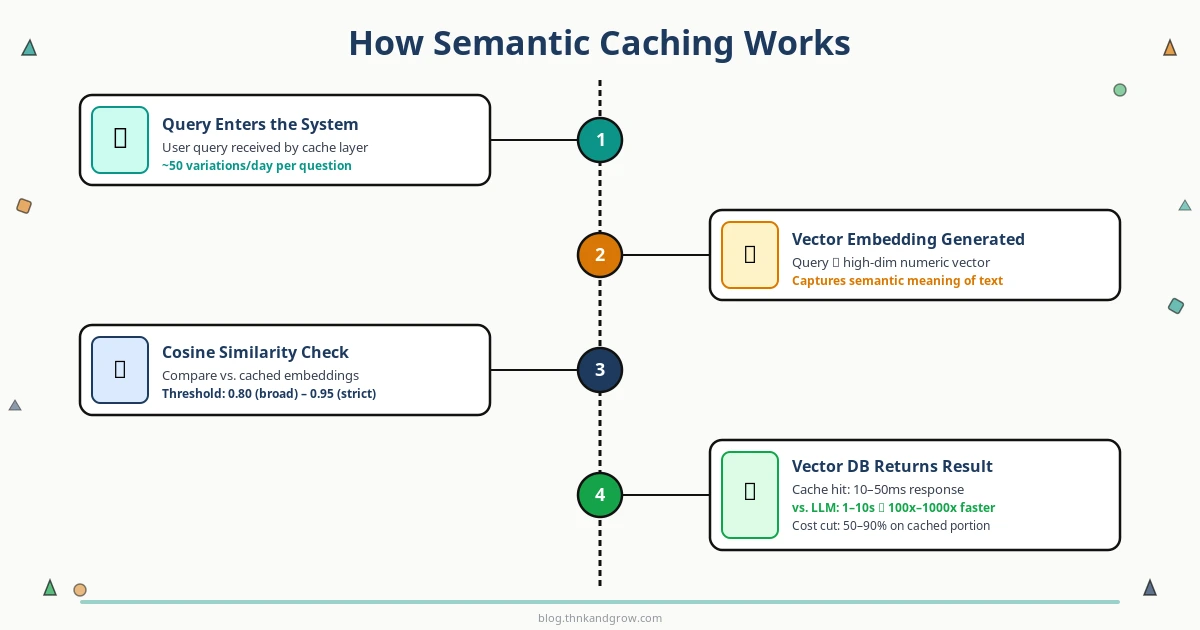
The mechanics of semantic caching follow a clear, repeatable flow. Understanding each step will help you configure and debug your implementation effectively.
The Step-by-Step Process
Query arrives — A user submits a question to your application.
Embedding generation — The query is converted into a vector embedding using an embedding model.
Similarity search — The embedding is compared against all stored embeddings in your vector database.
Cache hit or miss decision — If the closest stored embedding exceeds your similarity threshold, it’s a cache hit. The stored response is returned immediately.
LLM call (on miss) — If no sufficiently similar query exists, the system calls the LLM API as normal.
Store and return — The new query embedding and LLM response are stored in the cache, then the response is returned to the user.
What Are Vector Embeddings?
Think of a vector embedding as a way of converting text into a list of numbers — typically hundreds or thousands of numbers — that captures the meaning of that text. Sentences with similar meanings end up with similar numerical representations, even if they use completely different words. This is what makes semantic matching possible.
For example, the phrases “cancel my subscription” and “I want to stop my plan” would produce embeddings that are numerically close to each other, while “what’s the weather today?” would produce a very different set of numbers.
Cosine Similarity and Thresholds
The most common way to measure how similar two embeddings are is cosine similarity — a value between 0 and 1, where 1 means identical meaning and 0 means completely unrelated. When a new query arrives, the system calculates its cosine similarity against stored embeddings and checks whether the best match exceeds your configured threshold.
A threshold of 0.95 is strict — only very close paraphrases will match. A threshold of 0.80 is more permissive — broader variations in phrasing will still hit the cache. Choosing the right threshold is the most important tuning decision you’ll make, and we’ll cover it in the best practices section.
Why Semantic Caching Matters: Cost, Speed, and Scale
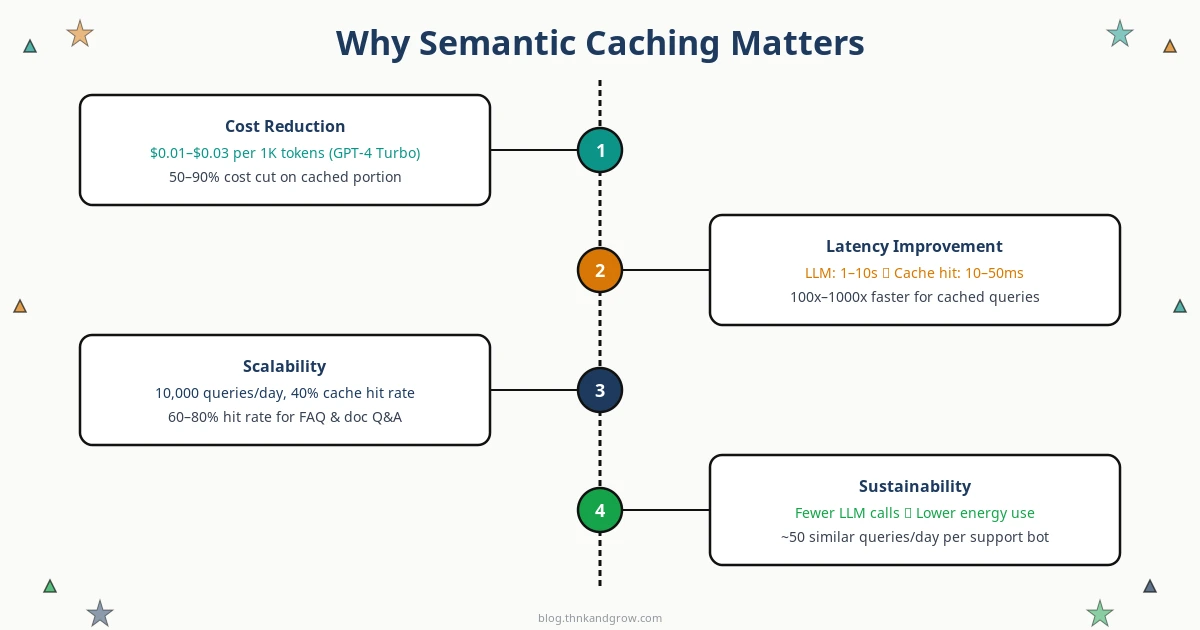
Cost Reduction
LLM API pricing adds up fast. GPT-4 Turbo runs approximately $0.01–$0.03 per 1,000 tokens, and a single detailed response can easily consume 500–1,500 tokens. In a customer support application handling 10,000 queries per day, even a 40% cache hit rate translates to thousands of dollars saved every month. For FAQ bots and document Q&A systems where query patterns are highly repetitive, hit rates of 60–80% are achievable.
Latency Improvement
LLM inference is slow by nature — typical response times range from 1 to 10+ seconds depending on the model and output length. A semantic cache hit, by contrast, returns in 10–50 milliseconds. That’s a 100x to 1000x latency improvement for cached queries. For user-facing applications, this difference is the gap between a frustrating experience and a delightful one.
Scalability and Sustainability
As your user base grows, LLM API costs typically scale linearly — more users means more calls means more spending. Semantic caching breaks that linear relationship. A well-tuned cache means your API call volume grows much more slowly than your user volume, making your cost curve sustainable. There’s also an environmental angle worth noting: fewer LLM inference calls mean lower GPU energy consumption, which matters as AI infrastructure scales globally.
Semantic Caching vs. Prompt Caching: Don’t Confuse the Two
These two terms are increasingly used in the same conversations, but they refer to fundamentally different mechanisms operating at different layers of the stack.
Semantic caching is application-level. It happens in your code, before any API call is made. It intercepts incoming queries, checks your vector database for similar past queries, and either returns a cached response or proceeds to call the LLM.
Prompt caching is API-level. It’s a feature offered by providers like Anthropic (since August 2024) and OpenAI. These systems cache the internal KV (key-value) attention states of repeated prompt prefixes at the inference layer. If you send the same long system prompt with every request, the provider can skip reprocessing that prefix, reducing your cost by 50–90% on the cached portion. Critically, this requires exact prefix matches — it doesn’t understand semantic similarity.
The good news: these strategies are complementary. You can use semantic caching at the application layer to avoid API calls entirely for similar queries, while simultaneously using prompt caching at the API layer to reduce costs on the calls that do go through. Together, they form a powerful two-layer cost optimization strategy.
Key Tools and Frameworks for Semantic Caching
GPTCache by Zilliz
The most comprehensive open-source library dedicated to LLM caching. GPTCache supports multiple embedding models, multiple vector store backends (FAISS, Milvus, Redis, Qdrant, Weaviate), and pluggable eviction policies. It integrates cleanly with LangChain, LlamaIndex, and the OpenAI SDK, making it the go-to choice for developers who want full control.
LangChain Caching Abstractions
LangChain provides a SemanticSimilarityExactMatchCache that wraps any LangChain-compatible vector store. If you’re already building with LangChain, adding semantic caching is a matter of a few lines of configuration. Swapping backends — from Chroma to Pinecone, for example — requires minimal code changes.
LlamaIndex and RedisVL
LlamaIndex includes native SemanticCache components that integrate with its broader indexing infrastructure. For teams already running Redis in production, the Redis Vector Library (RedisVL) offers a production-ready SemanticCache class that combines Redis’s legendary in-memory speed with vector similarity search.
Managed Options
If you’d rather not manage vector database infrastructure yourself, several managed options have matured significantly. Upstash Semantic Cache offers a serverless, pay-per-use API. Portkey and LiteLLM function as LLM gateways with built-in semantic caching middleware. Helicone combines observability with caching, giving you analytics on cache hit rates alongside your other LLM metrics.
Embedding Models to Consider
OpenAI text-embedding-3-small — Strong accuracy, easy to use if you’re already in the OpenAI ecosystem
Cohere Embed — Strong multilingual support, good for international applications
Choosing the Right Vector Database Backend
Your choice of vector database has real implications for performance, cost, and operational complexity. Here’s a practical decision framework:
Chroma — Lightweight, developer-friendly, runs locally with no server setup. Ideal for prototyping and development.
FAISS — Facebook’s in-memory similarity search library. No server required, blazing fast for smaller datasets. Great for early-stage applications.
Pinecone — Fully managed, production-ready, scales effortlessly. The right choice when you want to focus on your application rather than infrastructure.
Qdrant — High-performance, Rust-based, open-source. Excellent for teams that want self-hosted production deployments with strong performance characteristics.
Redis Stack — The natural choice if Redis is already in your stack. Adds vector search capabilities to your existing Redis infrastructure with minimal operational overhead.
The recommended path for most beginners: start with Chroma or FAISS for prototyping, validate that semantic caching delivers value in your specific use case, then migrate to Pinecone or Qdrant when you’re ready for production scale.
Best Practices and Common Pitfalls
Tuning the Similarity Threshold
This is the single most important configuration decision you’ll make. Set it too low and you’ll return cached responses for queries that are actually asking different things — serving wrong answers is far worse than serving slow ones. Set it too high and you’ll miss too many cache opportunities, negating the benefit. Start at 0.90 and adjust based on your observed hit rate and any accuracy issues. Monitor both metrics continuously.
Where Semantic Caching Excels
Semantic caching delivers the most value in high-repetition query environments: FAQ bots, customer support assistants, document Q&A systems, internal knowledge bases, and search tools. These applications naturally see the same questions asked repeatedly in slightly different ways — exactly the pattern semantic caching is designed to exploit.
Where It’s Less Effective
Highly personalized queries (where the answer depends on user-specific context), real-time data requests (“what’s the stock price right now?”), and complex multi-turn conversations with heavy context dependency are poor candidates for semantic caching. Forcing caching onto these patterns will produce incorrect results.
Cache Invalidation Strategies
Cached responses go stale. Use TTL (time-to-live) settings to automatically expire entries after a defined period. For content that changes on a known schedule, implement version-based invalidation — tag cache entries with a content version and invalidate when that version changes. For critical updates, support manual invalidation to immediately clear specific entries.
Security: Cache Poisoning
A malicious user could craft queries designed to populate your cache with incorrect or harmful responses that then get served to other users. Mitigate this by validating and sanitizing inputs before caching, implementing rate limiting on cache writes, and considering whether user-generated content should be cached at all without review.
Getting Started: A Simple Implementation Walkthrough
Here’s a minimal working example using LangChain’s semantic cache with Chroma as the vector store — one of the fastest paths to a working prototype:
# Install dependencies
# pip install langchain langchain-openai langchain-community chromadb

from langchain.globals import set_llm_cache
from langchain_community.cache import InMemorySemanticCache
from langchain_openai import OpenAIEmbeddings, ChatOpenAI

# Initialize embedding model
embeddings = OpenAIEmbeddings(model="text-embedding-3-small")

# Configure semantic cache
set_llm_cache(InMemorySemanticCache(
    embedding=embeddings,
    score_threshold=0.90  # Tune this based on your use case
))

# Your LLM calls now automatically use the semantic cache
llm = ChatOpenAI(model="gpt-4-turbo")

# First call — hits the LLM
response1 = llm.invoke("What is the capital of France?")

# Second call — hits the cache (semantically similar)
response2 = llm.invoke("What's France's capital city?")
Once you have this running, instrument the following metrics to measure your results:
Cache hit rate — What percentage of queries are being served from cache? Aim for 30%+ in repetitive query environments.
Latency reduction — Compare average response times for cache hits vs. misses.
Estimated cost savings — Track the number of API calls avoided and multiply by your per-call cost.
]]>https://blog.thnkandgrow.com/semantic-caching-llm-systems-beginners-guide/feed/0Serverless vs Containers vs VMs: Real Trade-offs in 2026
https://blog.thnkandgrow.com/serverless-vs-containers-vs-vms-trade-offs-2026/
Wed, 25 Mar 2026 01:56:53 +0000https://blog.thnkandgrow.com/?p=3477Serverless isn't always cheaper, containers aren't always portable enough, and VMs aren't dead — the real answer in 2026 is more nuanced than any vendor wants you to believe. This post breaks down the honest trade-offs across all three compute paradigms, including where the lines are blurring and how mature teams are mixing models in production. If you're making infrastructure decisions right now, this is the analysis you need before committing.
]]>Most comparisons of serverless, containers, and VMs are written by cloud vendors trying to sell you their preferred abstraction, or by tool advocates who’ve built their identity around a particular paradigm. The result is a landscape littered with benchmark cherries, idealized workloads, and conspicuously absent line items on the invoice. This post is an attempt to cut through that noise.
I’ve watched teams migrate to serverless to save money and end up with bills three times higher than their old container cluster. I’ve seen startups adopt Kubernetes because it felt “enterprise-grade,” then spend six months fighting YAML and never shipping product. And I’ve watched people dismiss VMs as legacy technology right before a compliance audit forced them back. In 2026, the stakes are high enough — and the options mature enough — that getting this decision wrong has real consequences. Let’s talk about the actual trade-offs.
A Quick Level-Set: What Each Paradigm Actually Is
Before diving into trade-offs, it’s worth being precise about what we’re comparing, because loose definitions lead to bad decisions.
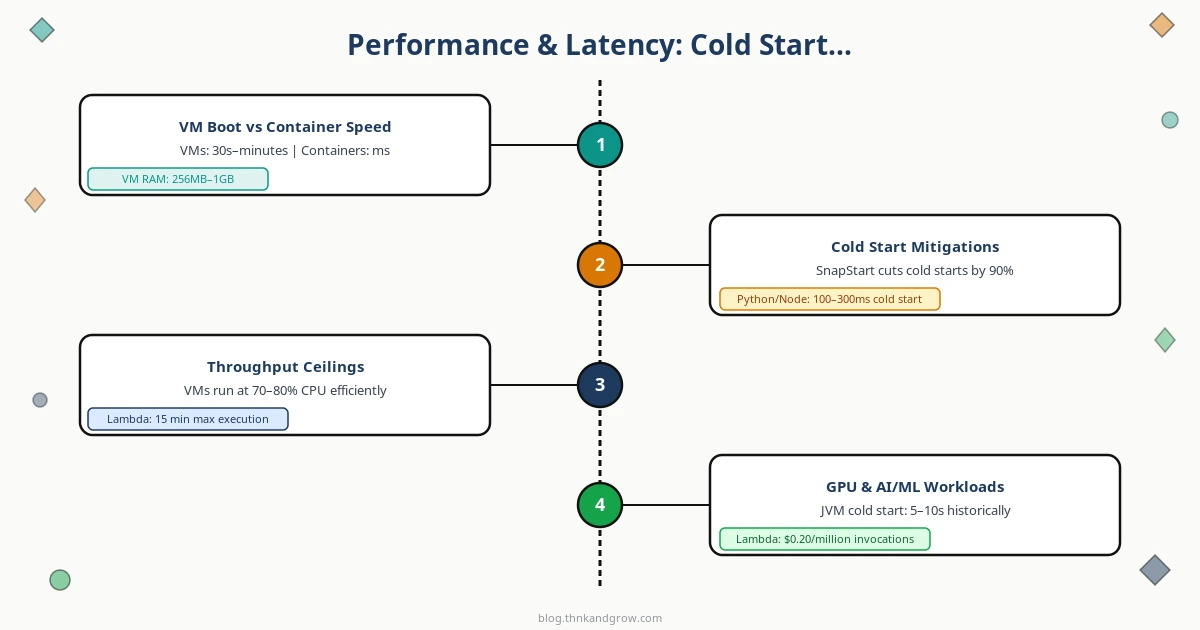
Virtual Machines run a complete operating system on top of a hypervisor — software (or dedicated hardware, in AWS’s Nitro system) that tricks the guest OS into believing it owns physical resources. Each VM carries its own kernel, system libraries, and application stack. Boot times run from 30 seconds to several minutes. The resource overhead is real: a minimal Linux VM consumes 256MB to 1GB of RAM before your application touches a byte. AWS launched EC2 in 2006 on Xen hypervisors, and that model — renting a slice of a physical machine — defined cloud computing for nearly a decade.
Containers share the host OS kernel and use Linux primitives — namespaces for isolation and cgroups for resource limits — to create the illusion of separate environments. Docker made this accessible in 2013. Containers boot in milliseconds, carry minimal overhead, and package everything your app needs into a portable image. The tradeoff: that shared kernel is both the efficiency win and the security liability.
Serverless functions (FaaS) sit at the top of the abstraction ladder. You write a function, define what events trigger it, and the cloud provider handles literally everything else — servers, scaling, patching, networking. AWS Lambda launched in 2014 and introduced per-millisecond billing. Cold starts range from 100ms to several seconds. You never manage a server, which sounds like pure upside until you try to debug a distributed system made of hundreds of ephemeral functions.
The abstraction ladder is the key mental model here: more abstraction means less operational control, lower ops burden, and deeper vendor dependency. Each paradigm emerged to solve the previous one’s dominant pain point. That history matters when you’re deciding which pain you’d rather live with.
The Cost Trade-off Nobody Does the Math On
Here’s the uncomfortable truth: serverless is not inherently cheaper. It’s cheaper under specific conditions, and dramatically more expensive under others. Teams that skip the math and assume “pay per use = lower bills” are in for a surprise.
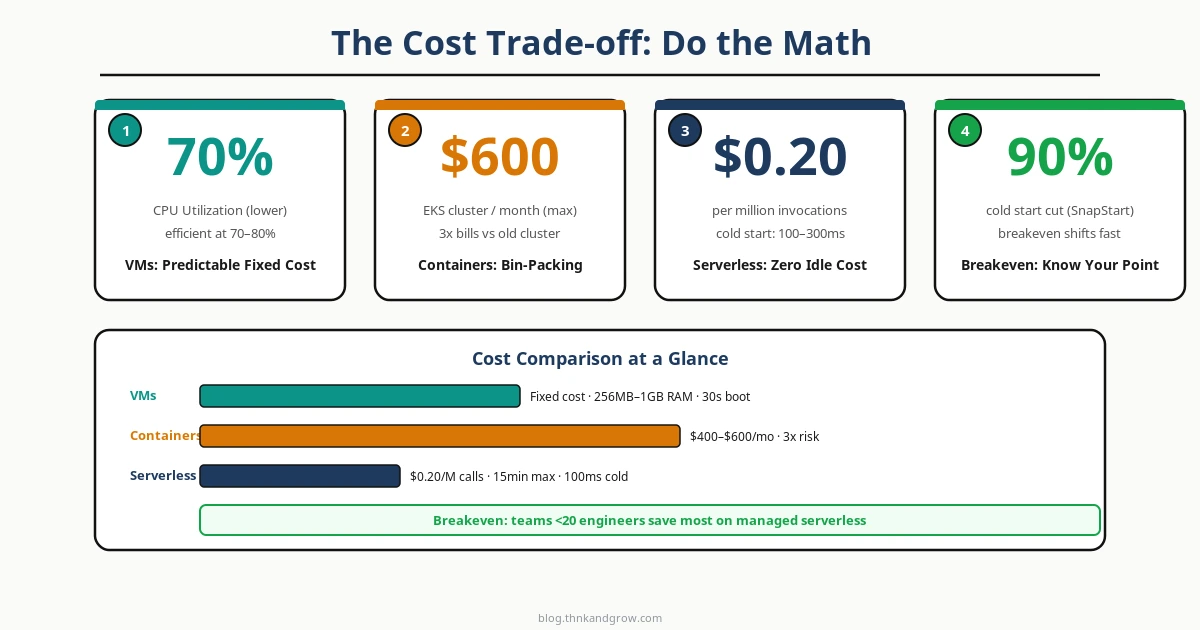
VMs have predictable, fixed costs. You pay for the instance whether it’s idle or saturated. This is wasteful at low utilization but highly efficient when you’re running at 70–80% CPU consistently. For steady, high-throughput workloads, a well-sized EC2 fleet is often the cheapest option per unit of compute.
Containers improve on VMs through bin-packing — running multiple workloads on shared nodes. But Kubernetes clusters carry hidden fixed costs: control plane fees, node overhead, persistent storage, load balancers, and the engineering time to operate the cluster. A three-node EKS cluster with supporting infrastructure often runs $400–600/month before a single line of application code executes.
Serverless billing is genuinely zero at zero load — that’s the real win. For spiky, unpredictable traffic with significant idle time, it’s hard to beat. But the math changes fast at scale. AWS Lambda charges approximately $0.20 per million invocations plus $0.0000166667 per GB-second. At high invocation volumes, this compounds quickly.
The concept to internalize is the break-even invocation threshold — the point at which your serverless bill exceeds what an equivalent container deployment would cost. For most workloads, this threshold is lower than teams expect. Calculate it before you commit, not after you’re locked in.
The Basecamp/37signals cloud exit narrative resonated in 2026 precisely because it made this math visible. DHH’s public accounting showed that at their scale, owned hardware dramatically undercut cloud costs. The lesson isn’t “leave the cloud” — it’s that cost assumptions need to be stress-tested at realistic scale. FinOps practices are now standard at mature engineering organizations for exactly this reason.
Performance and Latency: The Cold Start Elephant in the Room
Cold starts are the serverless performance story that vendors minimize and engineers obsess over. When a Lambda function hasn’t been invoked recently, the provider must initialize a new execution environment: download the function package, start the runtime, run initialization code. For Python or Node.js, this might add 100–300ms. For JVM-based runtimes, it historically added 5–10 seconds — a user-facing disaster.
Mitigations exist but come with costs. AWS Lambda SnapStart (for Java workloads) pre-initializes execution environments and can reduce cold starts by up to 90% — a genuine engineering win. Provisioned Concurrency keeps functions warm but eliminates the zero-idle-cost advantage. Google Cloud Run’s minimum instances feature does the same. You’re essentially paying container-like costs to get serverless-like operations, which is a legitimate trade-off but not the “magic” billing model the marketing implies.
Containers start in seconds and VMs in minutes, but once running, both eliminate cold start variability entirely. For user-facing APIs with strict p99 latency requirements, this predictability often matters more than average-case performance.
GPU and AI/ML workloads add another dimension. Long-running training jobs — hours or days of continuous computation — are fundamentally incompatible with serverless execution time caps (Lambda maxes out at 15 minutes). These workloads belong on VMs or bare metal with dedicated GPU instances. However, serverless GPU inference is emerging as a legitimate pattern: platforms like Modal and Replicate offer per-invocation GPU execution that’s economically sensible for sporadic inference requests. This is one of the more interesting architectural developments of the past two years.
Operational Complexity: Who Actually Manages What
The honest framing here is the “undifferentiated heavy lifting” spectrum. VMs require you to manage everything: OS patching, kernel updates, network configuration, security group rules, auto-scaling policies, and monitoring. Containers shift that burden to orchestration — but Kubernetes is not simple. It’s a distributed systems platform with its own failure modes, upgrade cycles, and operational surface area that rivals the applications running on it.
Kubernetes fatigue is real in 2026. Teams that adopted K8s three or four years ago because it was the industry standard are now questioning whether the complexity overhead justifies the control it provides. Smaller engineering teams — under 20 engineers — are increasingly migrating to managed platforms like Render, Railway, and Fly.io, which offer container deployment without cluster management. This isn’t a step backward; it’s an honest assessment of organizational capacity.
Serverless offloads nearly all operational burden, but it introduces its own category of problems. Function sprawl — hundreds of Lambda functions with inconsistent naming, overlapping responsibilities, and undocumented triggers — is a genuine operational nightmare in mature serverless architectures. IAM permission creep, where functions accumulate over-permissive roles over time, is a security and audit problem. Distributed tracing across event-driven function chains requires investment in observability tooling (AWS X-Ray, Datadog, Honeycomb) that adds both cost and complexity. Debugging a stateless function that misbehaves only under specific event payloads, in an environment you can’t SSH into, is a genuinely different skill set.
The team skill requirement is often the deciding factor that gets ignored in architectural discussions. VMs need sysadmin and networking expertise. Containers need DevOps and Kubernetes knowledge. Serverless requires cloud-native architecture thinking — understanding event-driven patterns, idempotency, and eventual consistency at a conceptual level. The best technology is the one your team can operate reliably at 2 AM.
Vendor Lock-in and Portability: The Risk Nobody Prices In
Containers win on portability, and it’s not close. OCI-standard container images run on AWS, GCP, Azure, on-premises Kubernetes, and your laptop. The application stack is decoupled from the infrastructure. This is the closest the industry has come to write-once-run-anywhere, and it’s a meaningful architectural advantage when you’re thinking about three-to-five year infrastructure horizons.
Serverless is the most proprietary compute model available. Lambda trigger integrations, event source mappings, execution environment quirks, and the specific behavior of AWS SDK integrations are deeply AWS-specific. Migrating a mature Lambda-based architecture to Google Cloud Functions isn’t a lift-and-shift — it’s a rewrite. Teams should price this lock-in risk explicitly before committing.
VMs sit in the middle. AMIs are AWS-specific, but the OS, application stack, and configuration management tooling (Terraform, Ansible) are portable with effort. Moving a VM-based workload between clouds is painful but tractable.
The serverless containers category — AWS Fargate, Google Cloud Run, Azure Container Apps — represents an interesting middle ground: container portability with serverless operational model. You don’t manage clusters, but you deploy standard container images. The APIs and configuration are still cloud-specific, but the application artifact is portable. This is why serverless containers are the fastest-growing segment of the compute market right now.
Worth watching: WebAssembly (WASM) is emerging as a potential fourth paradigm with stronger portability and sandboxing promises than either containers or serverless. Cloudflare Workers and WasmEdge are early indicators of where this might go. It’s not production-ready for general-purpose workloads yet, but the architectural properties are compelling.
Security Trade-offs: Isolation, Attack Surface, and Compliance
VMs provide hardware-level isolation via the hypervisor boundary. A vulnerability in one VM cannot directly affect another on the same host. This makes VMs the preferred choice for compliance-heavy workloads — PCI-DSS, HIPAA, and FedRAMP environments often mandate VM-level isolation in their control frameworks.
Containers share the host kernel, which means a kernel exploit can theoretically escape the container boundary. In practice, this risk is managed through runtime security tools (Falco, gVisor) and hardened base images, but it’s a real attack surface that containers-on-VMs architectures (the most common production pattern) partially mitigate. Log4Shell demonstrated how deep dependency chains in containerized applications create supply chain risk that’s genuinely difficult to enumerate and patch quickly.
Serverless reduces the attack surface in one dimension — there are no persistent servers to patch, and the provider handles OS security — while expanding it in another. Function permission sprawl, third-party event source trust, and the implicit trust relationships in event-driven architectures create security challenges that are less visible but equally serious.
Architecture Fit: Matching the Paradigm to the Workload
The most useful framing is workload-first, not paradigm-first:
VMs: Monolithic applications, legacy systems requiring specific OS configurations, stateful workloads, GPU training jobs, compliance-sensitive systems requiring hardware isolation, and high-utilization steady-state compute.
Containers: Microservices architectures, CI/CD pipelines, polyglot environments, workloads requiring portability across environments, and teams with existing Kubernetes investment and the skills to operate it.
Serverless: Event-driven processing, webhooks, scheduled batch jobs, APIs with spiky or unpredictable traffic patterns, rapid prototyping, and integration glue code between services.
The most important architectural insight of 2026 is this: mature production systems use all three simultaneously. A typical architecture might run PostgreSQL on a VM for predictable performance and isolation, core application services on containers for portability and density, and event processing pipelines on Lambda for cost-effective burst handling. The skill isn’t picking one paradigm — it’s knowing which workload belongs on which model.
The Convergence Trend: Lines Are Blurring in 2026
The boundaries between these paradigms are genuinely eroding. Serverless containers are the clearest example: Cloud Run and Fargate give you container portability with serverless economics and zero cluster management. ARM/Graviton adoption is improving price-performance across both Lambda and EC2, though Apple Silicon’s M-series chips have created ARM/x86 architecture mismatches that complicate local container development in ways that are still being worked out.
Edge computing is adding a new dimension entirely. Cloudflare Workers (serverless at the edge), Fly.io (containers near users), and WASM runtimes are pushing compute to the network boundary with trade-off profiles that don’t map cleanly onto the traditional three-paradigm model. The paradigm you choose today may not exist in its current form in five years. Design your architecture for change, not for permanence.
A Decision Framework: How to Actually Choose
When evaluating a workload, work through these questions in order:
Traffic pattern: Is it steady or spiky? Steady favors VMs or containers. Spiky favors serverless.
Execution duration: Under 15 minutes and stateless? Serverless is viable. Long-running or stateful? Containers or VMs.
Latency sensitivity: Sub-100ms p99 requirements? Avoid cold starts — use containers or provisioned serverless.
Team skills: What can your team operate reliably? Don’t choose K8s if you don’t have the expertise to run it safely.
Cost math: Calculate the break-even invocation threshold at your expected scale before committing to serverless.
Exit strategy: How painful would migration be in three years? Weight portability accordingly.
LiteLLM vs CliProxyAPI: Safe Integration Guide 2026
https://blog.thnkandgrow.com/litellm-vs-cliproxyapi-safe-integration-guide-2026/
Sat, 21 Mar 2026 10:13:55 +0000https://blog.thnkandgrow.com/?p=3454Combining LiteLLM with CliProxyAPI sounds powerful — but done wrong, it can expose your API keys and user data to serious risk. This guide breaks down exactly how these two tools differ, where each fits in your stack, and the safest integration pattern to use in production. If you're routing LLM traffic across multiple providers, getting this architecture right isn't optional — it's the difference between scalable infrastructure and a costly security incident.
]]>Managing LLM APIs in production has become one of the most pressing infrastructure challenges for development teams in 2026. As more applications embed AI capabilities, the need for reliable, cost-efficient, and secure API routing has exploded. Two tools that frequently appear in the same conversation — especially among Vietnamese and Asian developer communities — are LiteLLM and CliProxyAPI. While they serve overlapping but distinct purposes, combining them without a clear security strategy can introduce serious risks. This guide breaks down what each tool does, how they compare, and how to integrate them safely in a production environment.
What Is LiteLLM? Core Features and Strengths
LiteLLM is an open-source Python library and self-hostable proxy server developed by BerriAI. Its core value proposition is simple: give developers a single, unified OpenAI-compatible interface to call over 100 LLM providers — including OpenAI, Anthropic Claude, Google Gemini, AWS Bedrock, Azure OpenAI, Groq, Mistral, Ollama, and many more — without rewriting application code for each provider.
Beyond basic API unification, LiteLLM ships with a comprehensive set of production-grade features:
Load balancing: Distribute requests across multiple models or providers to maximize availability and throughput.
Cost tracking and budget management: Set per-key or per-team spending limits, with real-time cost visibility across all providers.
Virtual API keys: Issue internal keys that map to real provider credentials, so downstream services never touch your actual API keys.
Rate limiting and retry logic: Protect against quota exhaustion and handle transient failures gracefully.
Caching: Redis-backed or in-memory caching to avoid redundant LLM calls and reduce costs.
Observability integrations: Native support for Langfuse, Helicone, and other logging platforms for full request/response audit trails.
RBAC and SSO: Enterprise-grade role-based access control for team environments.
Kubernetes deployment: Official Helm charts for scalable, cloud-native deployments.
In terms of community traction, LiteLLM has grown to over 13,000 GitHub stars and consistently records more than 10 million monthly downloads on PyPI, with multiple releases shipped every week. It is, by any measure, the most mature open-source LLM gateway available today.
What Is CliProxyAPI? Understanding Its Role
CliProxyAPI (available at github.com/router-for-me/CLIProxyAPI) is a CLI-oriented proxy tool designed to route and manage LLM API calls through an intermediary layer. Unlike LiteLLM’s comprehensive gateway approach, CliProxyAPI is a lightweight tool — focused on providing an OpenAI-compatible endpoint that proxies requests to underlying LLM providers, often with simplified configuration via command-line arguments.
It has gained particular traction among developers in Vietnam and across Southeast and East Asia, primarily because it addresses a set of very practical, ground-level problems:
Bypassing geographic restrictions: Several major LLM providers restrict API access by region. CliProxyAPI allows developers to route traffic through servers in permitted regions, enabling access that would otherwise be blocked.
Cost sharing and simplified billing: Teams or communities can pool access through a shared proxy endpoint, reducing individual overhead.
Simplified authentication: Users interact with a single proxy endpoint rather than managing multiple provider credentials directly.
OpenAI-compatible interface: Any tool or library that speaks the OpenAI API format can point to a CliProxyAPI endpoint with minimal reconfiguration.
It is important to distinguish between self-hosted instances of CliProxyAPI — where you run the tool on your own server — and third-party hosted CliProxyAPI services operated by others. The security implications of these two deployment modes are vastly different, as we will explore shortly.
LiteLLM vs CliProxyAPI: Key Differences Compared
Understanding where these tools diverge helps clarify why combining them requires deliberate architectural thinking rather than ad-hoc configuration.
Scope and Feature Set
LiteLLM is a full-featured API gateway with enterprise capabilities: RBAC, budget enforcement, multi-provider load balancing, caching, and deep observability. CliProxyAPI is a lightweight proxy layer — lean by design, optimized for quick setup and access routing rather than governance or cost management at scale.
Control and Data Ownership
When you self-host LiteLLM on your own infrastructure, you maintain complete ownership of every request and response. No data leaves your environment unless you explicitly configure it to. With third-party hosted CliProxyAPI services, your prompts, responses, and potentially your provider API keys pass through infrastructure you do not control — a significant consideration for any team handling sensitive data.
Target Use Cases
LiteLLM is built for team and enterprise environments where cost governance, provider redundancy, and auditability are non-negotiable. CliProxyAPI fits the profile of an individual developer or small team needing fast, low-friction access to LLM APIs — particularly when direct provider access is geographically or financially constrained.
Security Risks to Know Before Combining Both Tools
Before wiring these two tools together, every team should have an honest conversation about the following risks:
API key exposure: If you configure LiteLLM to route through a third-party CliProxyAPI service using your real provider API keys, those keys are transmitted to — and potentially logged by — infrastructure you do not own. A single misconfigured or malicious proxy can drain your API quota or expose billing credentials.
Data privacy: Every prompt and response passing through an intermediary is a potential data leak. For applications handling personal information, medical data, or proprietary business logic, this is a compliance risk, not just a technical one.
Rate limit abuse and quota leakage: Shared proxy endpoints may be used by many parties simultaneously. Your quota could be consumed by other users on the same proxy, leading to unexpected rate limiting or cost overruns on your provider account.
Unverified endpoints: Community-shared proxy URLs — common in developer forums and Telegram groups — carry no guarantees of uptime, integrity, or security. Using them in production is equivalent to routing your application traffic through an unknown third party.
Rule of thumb: If you did not deploy the proxy server yourself, treat it as untrusted infrastructure. Never send real provider API keys or sensitive prompts through it without explicit security controls in place.
How to Safely Combine LiteLLM and CliProxyAPI
The safest integration pattern treats LiteLLM as the control plane and CliProxyAPI as a backend provider endpoint — one of potentially many — that LiteLLM routes to under specific conditions. This keeps all governance, key management, and observability centralized in LiteLLM, while CliProxyAPI handles only the routing layer it was designed for.
1. Secure Key Management
Never hardcode API keys in configuration files. Use environment variables at minimum, and prefer dedicated secret managers in production:
HashiCorp Vault for self-hosted secret management
AWS Secrets Manager or Google Secret Manager for cloud-native deployments
Doppler for developer-friendly environment variable management across environments
2. Use LiteLLM Virtual Keys
Issue virtual keys to all downstream services and team members. Real provider credentials stay inside LiteLLM’s secure configuration layer and are never exposed to application code or external services.
3. Enable Full Observability
Connect LiteLLM to Langfuse or Helicone to log every request routed through CliProxyAPI. This gives you a complete audit trail and makes anomaly detection possible.
Practical Example: Sample Configuration Setup
Here is a minimal but realistic config.yaml for LiteLLM that routes requests through a self-hosted CliProxyAPI endpoint, with budget limits and logging enabled:
This setup ensures that CliProxyAPI is just one backend option among many, with automatic fallback to Anthropic Claude if the proxy endpoint is unavailable. All traffic is logged to Langfuse, and no real keys are exposed downstream.
Best Practices for Production Deployment
Self-host LiteLLM on your own infrastructure. Use Docker Compose for smaller deployments or Kubernetes with the official Helm chart for production scale. Never rely on a shared or third-party LiteLLM instance for sensitive workloads.
Implement RBAC and per-key budget limits. Assign virtual keys with explicit spending caps to each team, service, or environment. This prevents a single runaway process from exhausting your entire monthly budget.
Enable Redis caching. Repeated identical prompts — common in development and testing — can be served from cache rather than forwarded to CliProxyAPI or any upstream provider, cutting costs significantly.
Configure fallback routing. Define at least one alternative provider for every model alias. If your CliProxyAPI endpoint goes down, LiteLLM should automatically route to a direct provider without manual intervention.
Rotate API keys regularly. Establish a rotation schedule for both real provider keys and LiteLLM virtual keys. Audit access logs after each rotation to detect any anomalies.
Only use self-hosted CliProxyAPI instances. If geographic routing is genuinely required, deploy your own CliProxyAPI instance on a VPS or cloud VM in the target region. This keeps data flow within infrastructure you control.
When to Use LiteLLM Alone vs Combined with CliProxyAPI
Not every team needs both tools. Here is a practical decision framework:
Use LiteLLM Standalone When:
Your team has direct, unrestricted access to major LLM providers.
Data sovereignty and compliance are top priorities — every request must stay within controlled infrastructure.
You need enterprise features like RBAC, SSO, and audit logging without additional complexity.
Consider Adding CliProxyAPI When:
Geographic restrictions genuinely prevent direct provider access from your deployment region.
You are self-hosting the CliProxyAPI instance and can verify the full data path.
Cost constraints make direct provider access impractical for development or testing environments.
Evaluate Alternatives First:
Before adding CliProxyAPI to your stack, consider whether OpenRouter or One API might serve the same purpose with greater transparency and community accountability. OpenRouter in particular offers a well-documented, commercially operated unified API layer that is easier to audit than an unknown community proxy.
Conclusion: Security-First LLM API Architecture in 2026
LiteLLM and CliProxyAPI address real and distinct problems in the LLM API management landscape. LiteLLM is a mature, enterprise-ready gateway that gives teams full control over routing, costs, and observability. CliProxyAPI is a lightweight access layer that solves practical geographic and cost barriers — but comes with security tradeoffs that cannot be ignored.
When combining both tools, the guiding principle is clear: LiteLLM is your control plane, and CliProxyAPI is just one backend endpoint it manages. All key management, access control, budget enforcement, and logging must live in LiteLLM. CliProxyAPI — especially if third-party hosted — should never be trusted with real provider credentials or sensitive data.
The teams that build reliable, cost-efficient LLM applications in 2026 are not the ones who find the fastest shortcut to an API endpoint. They are the ones who treat every proxy layer as a potential risk surface, instrument everything with observability, and maintain clear ownership of every byte that flows through their AI infrastructure.
Start with self-hosted LiteLLM, secure your keys, enable your audit logs, and only introduce CliProxyAPI — or any proxy layer — when you can verify exactly where your data goes. That discipline is what separates a production-grade LLM architecture from a security incident waiting to happen.
]]>DSPy + LiteLLM + ChatGPT: Build Smarter AI Pipelines in 2026
https://blog.thnkandgrow.com/dspy-litellm-chatgpt-ai-pipeline-2026/
Sat, 21 Mar 2026 00:41:32 +0000https://blog.thnkandgrow.com/?p=3447Stop wrestling with brittle prompts and hardcoded model dependencies. In this guide, you'll learn how to combine DSPy's optimizable pipeline approach with LiteLLM's unified proxy layer to build LLM programs that run on ChatGPT today and local Ollama models tomorrow — without touching your application code. This is the architecture that makes your AI stack actually production-ready.
If you’ve spent any meaningful time building LLM-powered applications, you know the drill. You craft a prompt, it works beautifully in testing, and then it quietly falls apart in production when the input varies slightly. You tweak it, test it again, and two weeks later a model update breaks everything. You’re not building software anymore — you’re babysitting strings.
Manual prompt engineering is fragile by design. It couples your application logic to specific phrasing, model quirks, and brittle formatting conventions. It doesn’t version well, it doesn’t optimize well, and it certainly doesn’t scale well. In 2026, as LLM applications move from experiments to production infrastructure, this approach is no longer acceptable.
The good news is that a three-layer architecture has emerged to solve exactly this problem: DSPy for intelligent, optimizable pipeline logic; a CLI Proxy API like LiteLLM for unified model access, cost control, and flexibility; and ChatGPT-compatible APIs as the universal interface standard that ties everything together. Each layer solves a distinct problem, and together they form one of the most practical stacks for building production-grade LLM systems available today.
This post walks through each layer in depth, shows you how to wire them together, and covers the real-world patterns that make this architecture genuinely powerful — not just in theory, but in deployed systems.
What Is DSPy and Why It Changes the Game
DSPy (Declarative Self-improving Python) was born out of Stanford’s NLP group, led by Omar Khattab, with a deceptively simple premise: stop writing prompts, start writing programs. Instead of manually crafting prompt strings and hoping they generalize, DSPy asks you to define the signature of what you want — the input fields, the output fields, and an optional description — and then lets the framework figure out how to prompt the model to achieve it.
The core abstractions are worth understanding deeply:
Signatures define the input/output contract of a language model call. A signature like question -> answer tells DSPy what goes in and what should come out. You can extend these with typed fields and field-level descriptions to guide behavior.
Modules are composable building blocks that wrap signatures with reasoning strategies. dspy.ChainOfThought adds intermediate reasoning steps before producing an answer. dspy.ReAct enables tool-using agents that can call functions and act on results iteratively.
Teleprompters and Optimizers are DSPy’s secret weapon. Tools like BootstrapFewShot and MIPRO v2 take your pipeline and a small labeled dataset and automatically generate, select, and optimize the few-shot examples and instructions that maximize your defined metric. They compile better prompts than most engineers write by hand.
The philosophical shift is significant. You’re no longer a prompt engineer — you’re a program architect. Your job is to define the structure and evaluation criteria of your pipeline. DSPy’s job is to find the optimal way to communicate that structure to whatever language model you’re using. This separation of concerns is what makes DSPy-based pipelines maintainable, testable, and model-agnostic in ways that raw prompt strings never can be.
What Is a CLI Proxy API and Why You Need One
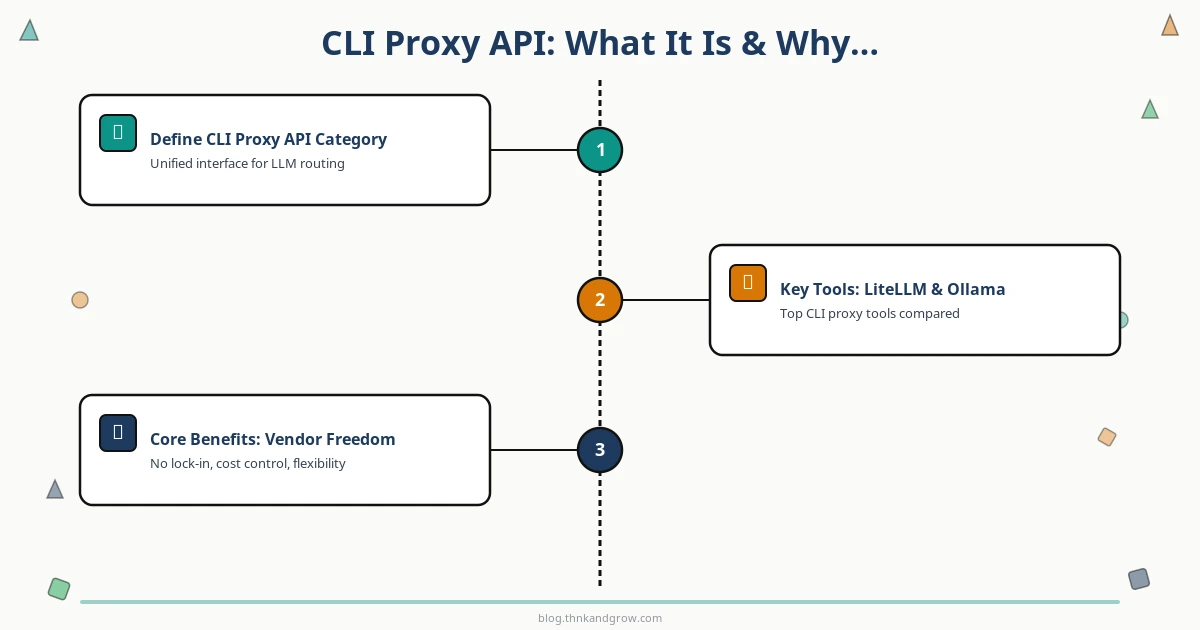
A CLI Proxy API is middleware that sits between your application and one or more LLM providers, exposing a unified, OpenAI-compatible interface regardless of what’s running underneath. You point your application at http://localhost:4000 instead of api.openai.com, and the proxy handles routing, authentication, cost tracking, caching, and fallback logic transparently.
The leading tools in this category each serve slightly different needs:
LiteLLM is the most production-ready option, supporting 100+ providers under a single interface. Its litellm proxy CLI command spins up a local server in seconds, and its enterprise tier adds Redis caching, PostgreSQL logging, load balancing, and team-based cost controls.
Ollama makes running local models (Llama 3, Mistral, Gemma, and others) as simple as ollama run llama3, and exposes an OpenAI-compatible server at localhost:11434.
vLLM is the go-to for high-throughput GPU inference in self-hosted environments, with PagedAttention for efficient memory management.
OpenRouter provides cloud-based routing across dozens of frontier models, useful when you want multi-provider access without running your own infrastructure.
LocalAI and LM Studio round out the local inference options, each with their own trade-offs around ease of use and model format support.
The core benefits of this layer are concrete and compounding. You eliminate vendor lock-in — your application code never needs to change when you switch models. You gain cost control through routing rules that send expensive tasks to powerful models and cheap tasks to lightweight ones. You enable private inference by swapping cloud APIs for local models without touching application logic. And you get production-grade observability that DSPy alone simply doesn’t provide.
How ChatGPT Fits Into This Architecture
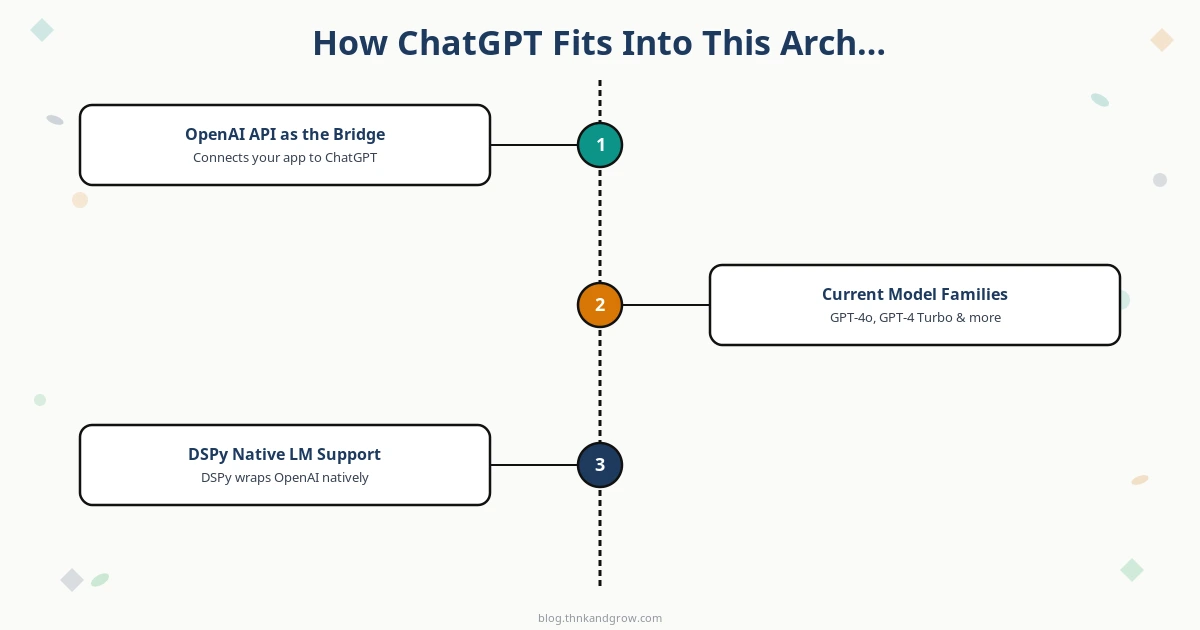
OpenAI’s API has become the de facto interface standard for the LLM ecosystem — not because it’s the only option, but because virtually every proxy tool, local inference server, and alternative provider has chosen to emulate it. The /v1/chat/completions endpoint, the message format, the streaming protocol — these have become the HTTP of LLM communication.
OpenAI’s current model family in 2026 offers meaningful trade-offs for pipeline design:
GPT-4o remains the workhorse for complex reasoning, multimodal tasks, and high-stakes generation where quality is non-negotiable.
GPT-4o-mini is the cost-efficiency champion — surprisingly capable for classification, extraction, summarization, and routing decisions at a fraction of the cost.
o1 and o3 reasoning models introduce extended thinking chains for problems that benefit from deep deliberation, though at higher latency and cost. They’re best reserved for tasks where reasoning depth genuinely matters.
DSPy integrates with all of these natively through its dspy.LM wrapper. The key is that this same wrapper works identically whether you’re pointing at OpenAI directly or at a proxy that emulates the OpenAI interface. The pattern is clean and consistent:
Change the base_url to point at Ollama, vLLM, or OpenRouter, and your entire DSPy program runs against a completely different model without a single other line of code changing. That’s the power of the interface standard.
Setting Up the Stack: DSPy + LiteLLM Proxy + ChatGPT
Getting this stack running takes less than ten minutes. Here’s the practical path:
Step 1: Install the dependencies
pip install dspy-ai litellm
Step 2: Create a LiteLLM configuration file (litellm_config.yaml):
import dspy

# Configure DSPy to use the LiteLLM proxy
lm = dspy.LM(
    "openai/gpt-4o",
    base_url="http://localhost:4000",
    api_key="any-string"  # LiteLLM handles auth internally
)
dspy.configure(lm=lm)

# Define a simple Chain of Thought Q&A module
class SimpleQA(dspy.Module):
    def __init__(self):
        self.generate = dspy.ChainOfThought("question -> answer")

    def forward(self, question):
        return self.generate(question=question)

# Run it
qa = SimpleQA()
result = qa(question="What are the trade-offs between GPT-4o and GPT-4o-mini?")
print(result.answer)
That’s a complete, working DSPy pipeline running through a production-capable proxy. From here, you can add optimizers, swap models, enable caching, and scale horizontally — all without restructuring your application logic.
Real-World Use Cases for This Stack
The abstract architecture becomes compelling when you see it applied to concrete problems:
Cost-Optimized Pipelines
Most LLM applications have a mix of task complexity. A document processing pipeline might need GPT-4o for nuanced synthesis but only GPT-4o-mini for entity extraction or classification. With LiteLLM’s routing rules, you can define this logic once in the proxy configuration and let your DSPy modules stay model-agnostic. The result: the same quality output at 60–80% lower inference cost, with no changes to application code.
Private and Enterprise Inference
For teams operating under data residency requirements or handling sensitive information, the proxy layer enables a clean swap from ChatGPT to a locally-hosted Ollama model. Change one line in your LiteLLM config, and your entire DSPy program now runs against Llama 3 on your own hardware. Your DSPy signatures, modules, and optimized prompts transfer completely — the framework doesn’t care what’s behind the OpenAI-compatible endpoint.
Multi-Model Experimentation
DSPy’s optimizers are most valuable when you can benchmark them across models. With the proxy layer, you can run MIPRO v2 against GPT-4o, GPT-4o-mini, and a local Mistral model simultaneously, compare metric scores, and make data-driven decisions about the cost/quality trade-off for your specific task. This kind of systematic experimentation is impractical without a unified interface layer.
Best Practices and Pitfalls to Avoid
Having the right tools is only half the battle. Here are the patterns that separate clean implementations from messy ones:
Always use dspy.configure(lm=...) as your primary model setup method. Avoid passing model instances directly to modules — the global configuration pattern keeps your code clean and makes model swapping trivial.
Enable LiteLLM’s caching early. Redis-backed caching can eliminate redundant API calls during development and optimization runs, saving significant cost. Configure it in your litellm_config.yaml before you start running expensive teleprompter loops.
Don’t optimize prematurely. DSPy’s teleprompters are powerful, but running MIPRO v2 before your pipeline logic is stable wastes tokens and produces optimizations that become stale as you iterate. Get the structure right first, then optimize.
Test proxy connectivity before optimization runs. A misconfigured proxy that silently returns errors will cause DSPy optimizers to produce nonsensical results. Always run a simple lm("hello") call and verify the response before kicking off any multi-step optimization loop.
Use LiteLLM’s PostgreSQL logging for debugging. When something goes wrong in a complex DSPy pipeline, having full request/response logs with latency and cost data is invaluable. Set this up from day one, not as an afterthought.
The Ecosystem at a Glance: Tools, People, and What’s Next
Understanding who’s driving this ecosystem helps you follow the right signals for where it’s heading. Omar Khattab, now at Databricks after his Stanford tenure, continues to lead DSPy development with strong institutional backing. The Stanford NLP Group remains the academic anchor for research contributions. On the infrastructure side, Ishaan Jaffer and the LiteLLM team have built what is arguably the most production-ready proxy layer in the ecosystem, with growing enterprise adoption validating the architecture.
DSPy 2.5 and beyond have brought meaningful improvements: native multi-LM support within a single program (different modules can use different models), improved async execution for high-throughput applications, MIPRO v2’s more reliable optimization convergence, and official bridges to LangChain and LlamaIndex for teams with existing investments in those frameworks.
Looking ahead, the most significant developments to watch are the deeper integration of structured outputs (native JSON schema enforcement now standard across major providers), the maturation of o3-class reasoning models for tasks that genuinely benefit from extended thinking, and the continued enterprise adoption of this stack for regulated industries where the private inference capability is non-negotiable.
Conclusion: Build Once, Run Anywhere
The core thesis of this architecture is simple but powerful: LLM application logic should be independent of the model it runs on, the provider it calls, and the prompts it uses to communicate. DSPy handles the logic and optimization. The CLI proxy handles the routing, cost control, and model abstraction. ChatGPT-compatible APIs provide the universal interface standard that makes the whole system composable.
Together, these three layers solve the real problems of production LLM development — not just the fun parts of getting a demo working, but the hard parts of maintaining it, scaling it, controlling its costs, and evolving it as models and requirements change.
The best way to internalize this architecture is to start small. Pick a single DSPy module — a ChainOfThought for a task you already have — spin up a LiteLLM proxy locally, and point DSPy at it using the dspy.LM pattern. Get that working end-to-end. Then add a second model to your proxy config and try swapping between them with a single line change. Once you feel how clean that abstraction is, the path to more complex pipelines, optimizer runs, and multi-model routing becomes obvious.
In 2026, the teams building the most maintainable and cost-efficient LLM applications aren’t the ones with the cleverest prompts. They’re the ones who stopped writing prompts altogether — and started writing programs instead.